Deletion Targets
Prepare categories such as SMS, contacts, call logs, photos, documents, and app data in advance.
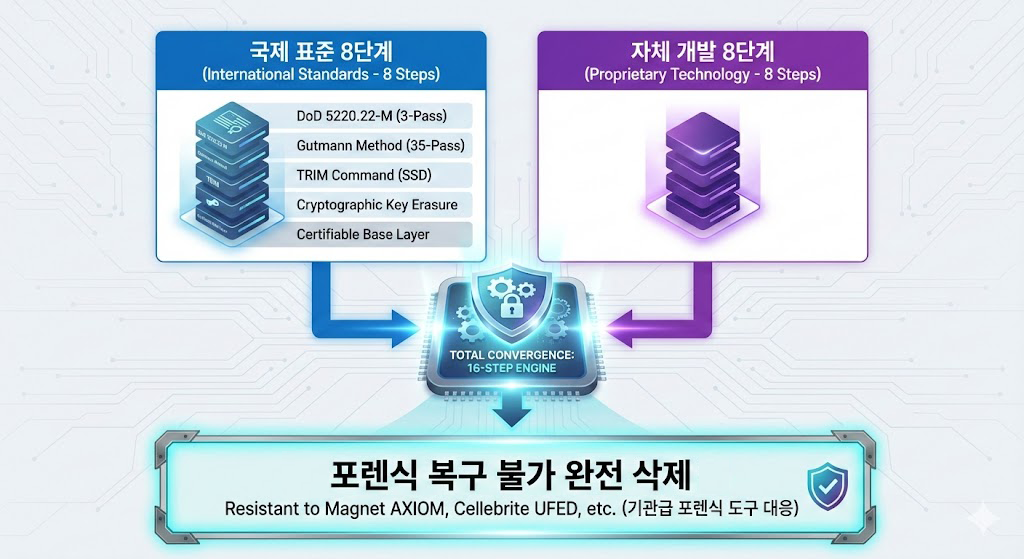
An anti-forensic phone setup means preparing permissions, storage behavior, deletion targets, and trigger paths together. NULLTRACE is designed to prepare a secure deletion workflow based on international secure-deletion references and a proprietary engine design.
Prepare categories such as SMS, contacts, call logs, photos, documents, and app data in advance.
Configure one-touch, remote message, Airplane Mode detection, and SIM removal detection conditions for different scenarios.
Use whitelist and USB blocking rules to consider both preserved records and blocked access paths.
Forensic-aware behavior can vary by device model, OS version, permissions, storage design, and manufacturer policy. Consultation and device testing help confirm which data categories and protection rules are appropriate for the target device.
An anti-forensic phone is not a single magic feature. It is closer to deciding in advance which records to clear and under which conditions, then confirming it behaves that way on the actual device.
For situations where a mobile forensics process could follow, and it helps to decide in advance which records to clear and which to keep.
For preparing a preset response so records can still be cleared under defined conditions when the device cannot be operated directly.
For work that handles sensitive material, where deletion scope and preserved scope need to be managed together against exposure risk.
For clearing selected data before a phone is replaced or discarded, without wiping everything by force.
An anti-forensic phone setup begins with deciding what to clear, when it runs, and how records are protected. Separating deletion targets, triggers, and protection rules makes the configuration easier to plan.
Choose in advance which categories to clear from SMS, contacts, call logs, photos, documents, and app data.Selected items can be cleared on their own, without a full factory reset.
Set conditions such as one-touch deletion, passphrase-based remote wipe, Airplane Mode detection, and SIM removal detection.Detection-based features run only when the user enables them and registers the conditions.
Contacts, SMS, and call logs that should be kept are separated into a whitelist and excluded from deletion.USB blocking limits external-device connections to reduce data exposure paths.
A patent-oriented proprietary engine combines secure-deletion references from international standards with a proprietary design.Deletion targets and triggers are grouped into a single forensic-aware flow.
Everyday deletion or a factory reset takes a different approach from a setup where conditions are designed in advance. The table below summarizes the broad differences; actual behavior is confirmed through consultation and device testing.
| Aspect | Plain delete or reset | NULLTRACE forensic-aware setup |
|---|---|---|
| Deletion method | Full reset or manual item-by-item deletion | Selective deletion of configured categories, without a full reset |
| Trigger | Operated by hand each time | One-touch, remote, Airplane Mode, and SIM detection preset in advance |
| Preserved data | Hard to separate items to keep | Items to keep are separated with a whitelist |
| Behavior check | No separate verification step | Confirmed through consultation and device testing |
A forensic-resistant phone setup is not completed by absolute wording. The deletion and preservation scope is agreed during consultation, checked on the actual device, and only then put into use.
Review the use environment, device model, and the situations you want to prepare for.
Design deletion targets, preserved targets, and trigger conditions to match the intended use.
Confirm how the designed setup actually behaves on the target device.
Begin use after verification, and manage new versions through the self-update notice.
Common questions that come up while reviewing a setup. Guidance can vary with device state and intended use, so details are confirmed during consultation.
It is less a single feature than a setup that decides in advance which records to clear and under which conditions, then confirms the behavior on the actual device.Deletion targets, preserved targets, and triggers are agreed during consultation.
That cannot be stated in absolute terms.Forensic-aware behavior varies by device model, OS version, permissions, storage design, and manufacturer policy, so the actual scope is confirmed through consultation and device testing.
It targets categories set in advance, such as SMS, contacts, call logs, photos, documents, and app data.Items that need to be kept are separated into a whitelist and excluded from deletion.
They run only when the user enables the feature and registers the conditions.Depending on settings, secure deletion can run when Airplane Mode is detected or when a registered SIM is removed, and the feature can be disabled before normal use or a SIM swap.
Setup is currently available on the Samsung Galaxy S24, running Android.Quotes are handled by email, from a minimum of two units.
Android phones may support data migration depending on the manufacturer tools and device state.After basic setup of the new device, Data Transfer Mode helps prepare connection and restore steps so they do not conflict with protection features.