Workplace Device Configuration
Devices are prepared around required workplace apps and security features. USB blocking, remote deletion, and whitelist protection are configured to match the operating purpose.
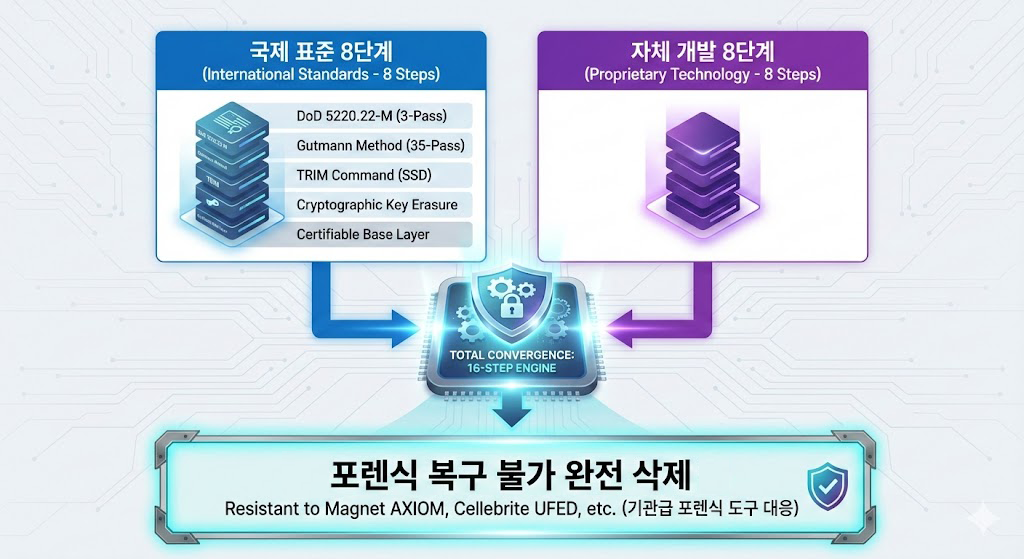
The organization setup prepares multiple secure mobile devices around real workplace requirements. A patent-type proprietary deletion engine, remote deletion, loss response, and USB blocking help reduce field security risk.
Organization devices are prepared for field work, travel, and sensitive data handling environments. Deletion targets and protection features are configured by purpose, and deletion-target personal data is not stored.
Devices are prepared around required workplace apps and security features. USB blocking, remote deletion, and whitelist protection are configured to match the operating purpose.

One-touch deletion, passphrase remote deletion, whitelist protection, USB blocking, and Airplane Mode detection can be included. Predefined response flows can be used when direct operation is difficult.
Feature sets can be kept consistent when multiple users operate secure mobile devices. Location checks, camera blocking, remote deletion, and other options are reviewed during consultation according to the operating purpose.
Organization features should be used only within the scope disclosed to, and agreed by, the relevant users. Please review internal security policies and applicable laws before deployment.
Configure deletion targets and protection features for the work environment.
Respond with a predefined trigger when the device cannot be accessed directly.
Transferable data from existing Android phones can be moved to the secure mobile device.
Deletion-target contacts and sensitive information are not stored on the service server.

The patent-type engine combines international secure-deletion references with proprietary design principles. When deletion result materials are needed, the available scope is explained during consultation.
Deletion targets and protection flows are guided according to device state and use case.
Available result materials can be provided only when appropriate for the operating environment.
When employee devices are replaced with Bamvy Sweeper secure mobile devices, transferable Android data can be moved after review. Data Transfer Mode temporarily prepares the device so migration and restore steps do not conflict with protection features.
Confirm the existing Android phone, without SIM, and the new secure mobile device.
Prepare the new device so Bamvy Sweeper protection can be used.
Temporarily prepare the device, then move transferable data using the appropriate migration tool.
Confirm Bamvy Sweeper settings and protection features after migration.